This page links to useful resources.
Java 23
BE SURE TO INSTALL JAVA FIRST. We will be using Java 25 for this course. Follow the instructions below to install the Temurin OpenJDK open source version of the Java 25 JDK.
IntelliJ
We will be using the IntelliJ IDE for this course.
Once you have both Java 25 and IntelliJ installed, start IntelliJ and at the startup screen
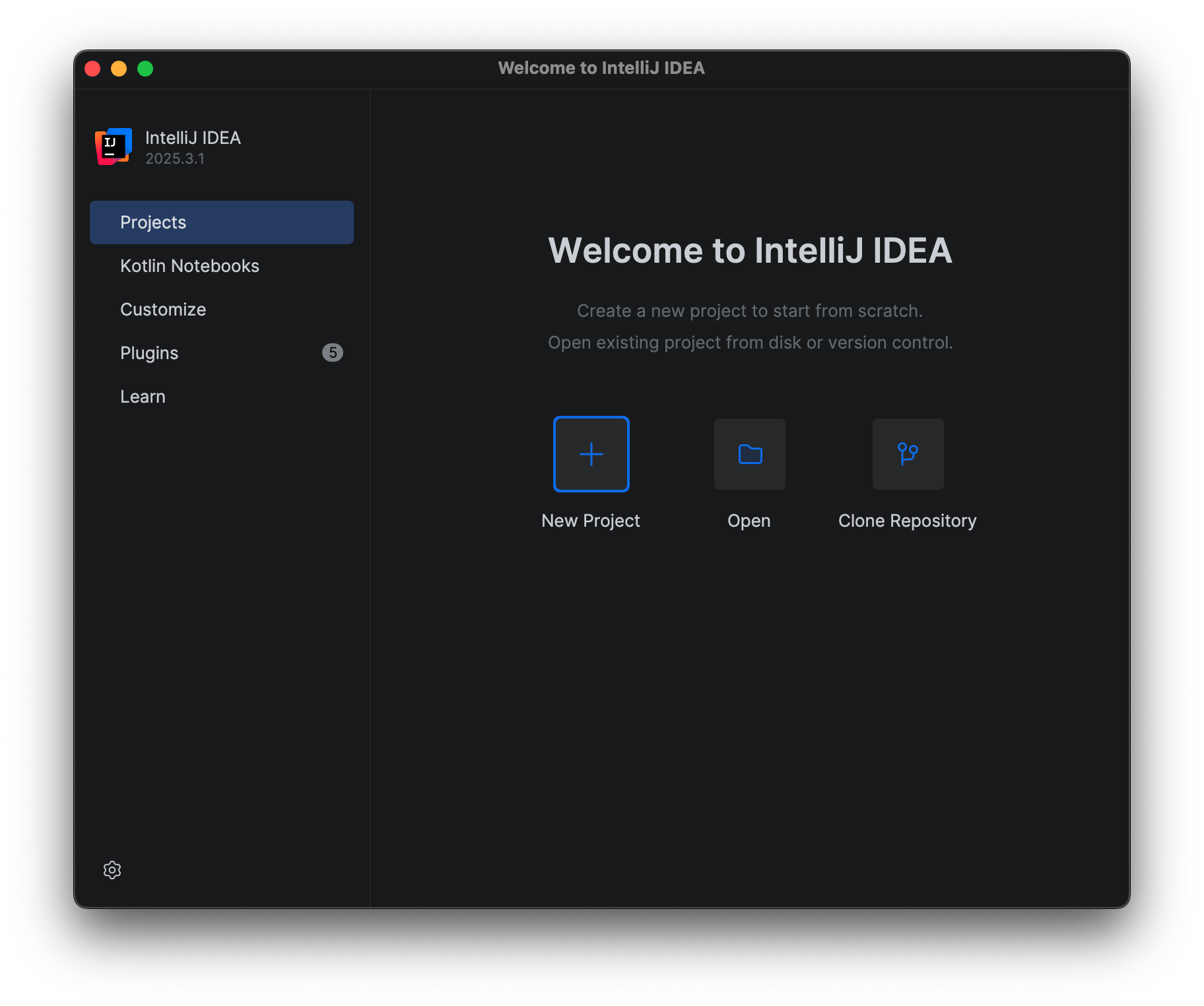
select File->Project Structure from the menu bar.
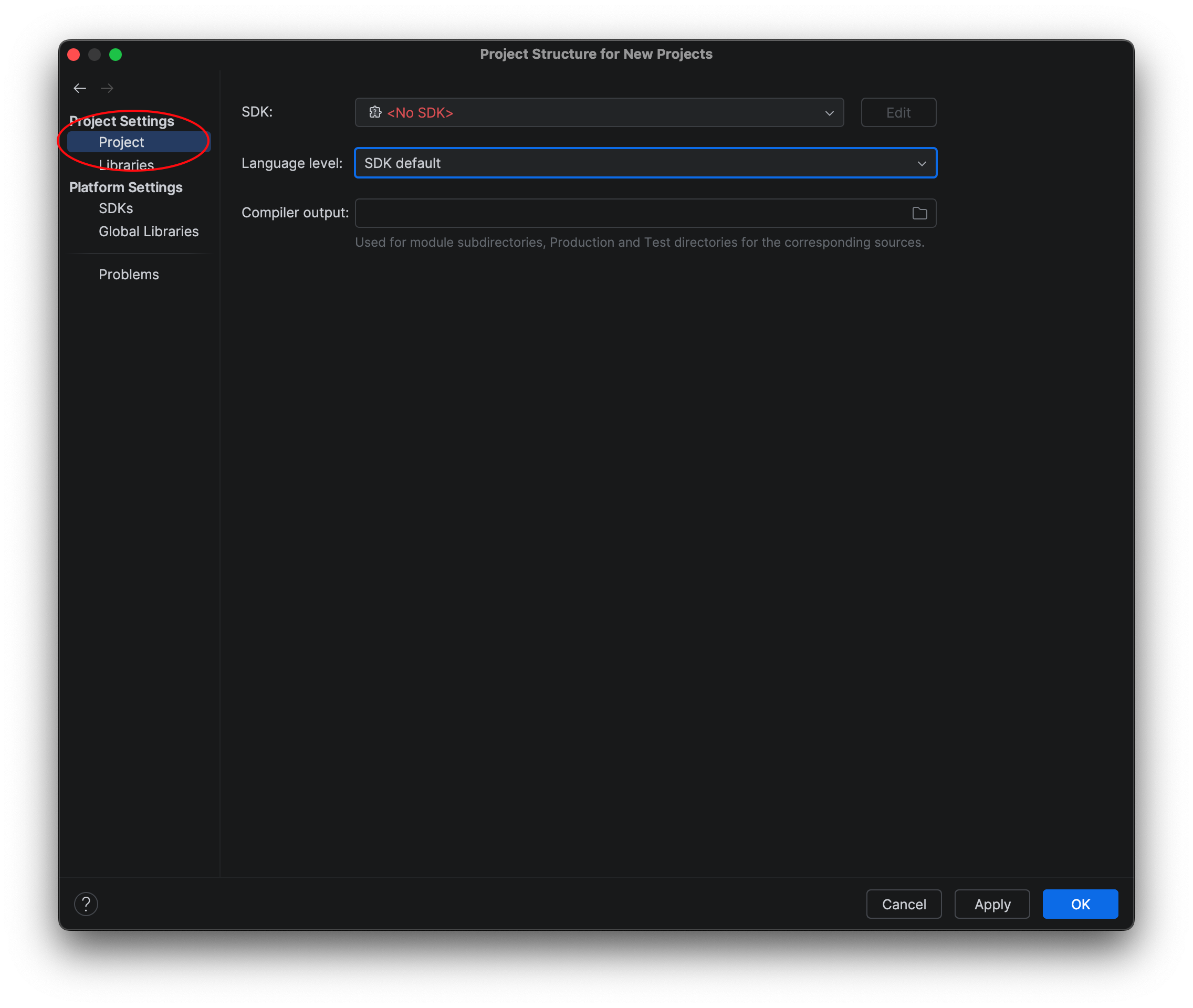
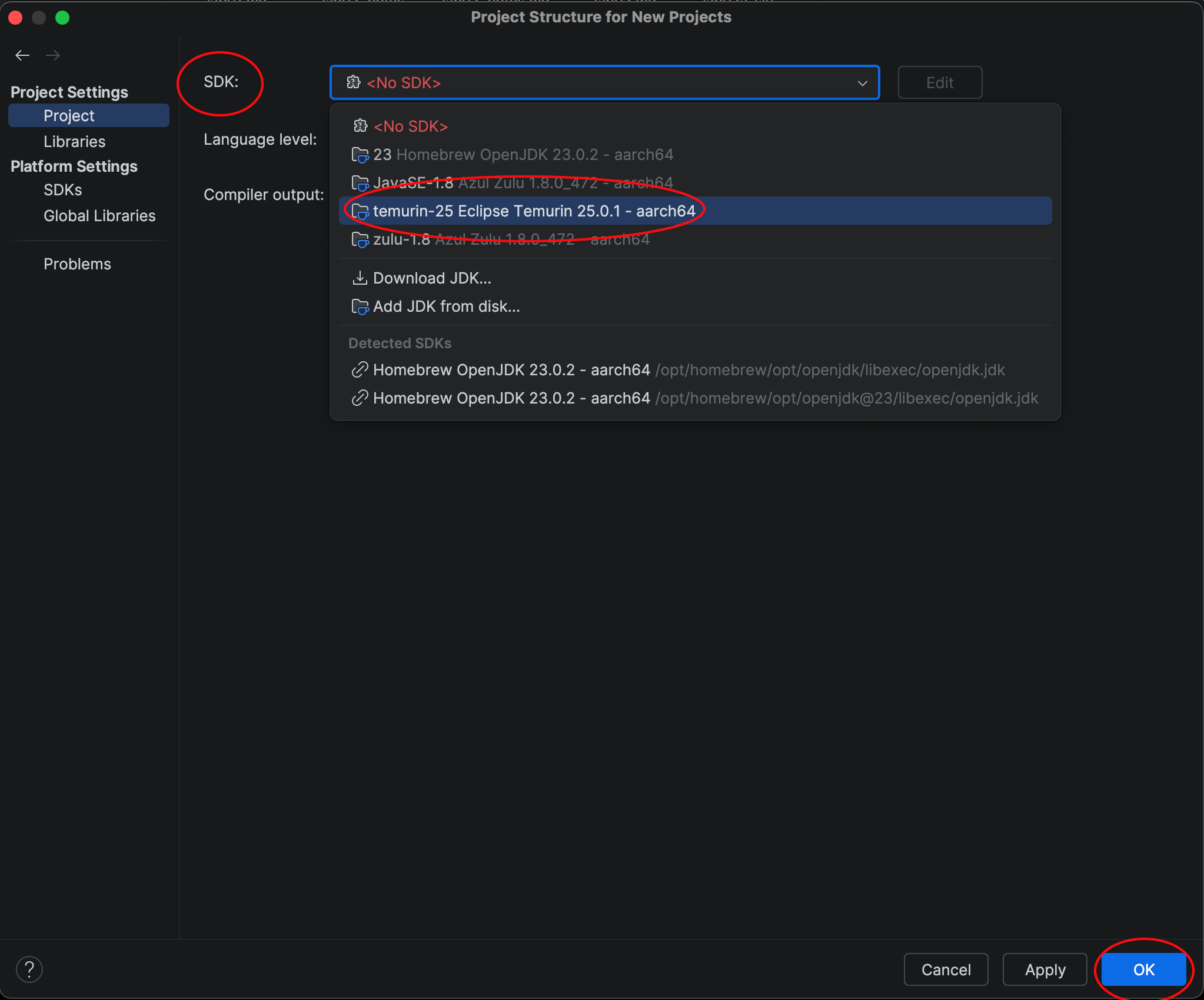
Under Project Settings, select Project and in the SDK dropdown, select the Temurin Java 25 option and click OK.
Artificial Intelligence (AI) and ChatGPT
ChatGPT: ChatGPT (andother large language models - LLMs) will be able to give you answers (or at least point you in a generally good direction) for many of the topics listed below. You should sign up for the free ChatGPT account so that you can keep track of your conversations.
Hypertext Mark-Up Language (HTML) and Cascading Style Sheets (CSS)
w3Schools.com: Go here first for HTML/CSS, SQL, JavaScript, PHP tutorials
Free Code Camp: Covers HTML/CSS (you need to create a free account)
Basic HTML Tutorial: Tutorial site for Basic HTML
HTML Forms Tutprial: Tutorial site for creating HTML Forms
HTML Tables Tutorial: Tutorial site for creating HTML tables
Basic CSS Tutorial: Tutorial site for using CSS
CSS Reference: CSS reference guide from Web Design Group
Bootstrap: A visual editor for creating web front-ends
Brackets: A visual editor for working on HTML/CSS
Java Server Pages (JSP) and Java Standard Tag Library (JSTL)
JSP Tutorial: Tutorial site for working with JSPs (note that this references Apache Tomcat, but much of it should apply to Eclipse Jetty)
JSTL Tutorial: Tutorial site for working with JSTL (linked from above site)
Session Information: Creating and using session information (linked from above site)
JavaScript (JS)
JavaScript Tutorial - w3schools: JavaScript tutorial w/sandbox from w3shools.com
JavaScript Tutorial: Basic JavaScript tutorial
Free Code Camp: Covers various JavaScript versions (you need to create a free account)
Email address validation
A Java email validator class using regex (regular expressions)
Drawing Packages for Wireframes, UML Diagrams, and Database Schemas
I recommend using either of the following free tools for creating your diagrams for your group’s Wireframes, UML Diagrams and Database Schemas. You may use other drawing tools, but whichever drawing tool you use, you must be able to export PDF, PNG, or JPG versions of your drawings, so that you can embed them on your assignment submissions.
Git, GitHub, eGit, Git Desktop Clients
GitHub Desktop - Desktop CLient for GitHub: An alternative to using Intellij’s built-in versioning. It works outside of your IDE, but many students/faculty consider it easier to use.
Git-Tower - Desktop Client for Git: An alternative to using Intellij’s built-in versioning. It works outside of your IDE, but many students/faculty consider it easier to use.
Git Branching Demo: Great JavaScript-based demo for using branches in Git
Free Code Camp: Covers Git and GitHub (you need to create a free account)
Git Website: Everything you ever wanted to know about Git, but were afraid to ask
Git eBook: ProGit v2: Available free in PDF form
Git Reference Manual: Git command-line reference
Git Videos: Tutorials on getting started with Git
Git Downloads: Git Clients and Tools
GitHub - Remote Repository Host: Teams will create their remote repositories on GitHub
Unified Modeling Language (UML)
UML Diagrams: A concise explanation of UML relationships and diagrams
Relational Databases and Structured Query Language (SQL)
SQL Tutorial - w3schools: Go here first for SQL tutorials w/sandbox from w3schools.com
Free Code Camp: Covers SQL Databases (you need to creaate a free account)
CS320 Functor Sample
CS320_FunctorSample.zip: A brief example showing how to make multiple functors to use to sort a sample String array list.
For some notes on functors see CS201 Functor Notes.
CS320 Lab06 (JDBC) Solution will be posted here shortly after the final submission date for Lab06 (see lab schedule)
CS320_Lab06_Solution-2026.zip: A solution for the JDBC lab (Lab06). Please compare your solution to this code, and make any necessary changes in your code, as an exercise to further understand the material. There are plenty of comments included in the solution to describe what is happening and why it is being done.
CS320 Library Example Project will be posted here shortly after the final submission date for Lab07 (see lab schedule)
CS320_LibraryExample_2026.zip: project that ties the Web Applications Lab together with the ORM Lab. This application places a web front-end on the SQL transactions from Lab07, as well as provides examples for creating a Derby database from CSV files, how to use session information after login, and how to use JSTL to display a list of complex objects in a JSP. It has been updated to incorporate a many-to-many (M2M) relationship between Books and Authors, using a junction table (booksAuthors) that cross-references book_id’s with author_id’s. It also contains some basic (non-exhaustive) JUnit Tests for testing the Derby database queries.
NOTE: You are free to incorporate any of this code into your team project(s) - as long as you cite the source in your code and refactor the names from the db and web directories to something that pertains to your project.
Before running the project, open up DerbyDatabase.java under src/main/java/edu.ycp.cs320.example/db/persist and note the default Derby database name and path in the connect() method (which is also used in SQLDemo.java in the main() method). By default the database will be named library.example.db and located in the same folder as the CS320_LibraryExample_2026 directory, i.e. outside the project directory.
If you choose to change the location, DO NOT LOCATE YOUR DATABASE WITHIN THE LibraryExample PROJECT. You will likely be using the LibraryExample as the basis for your team project, and placing the database within the project will eventually result in frustrating Git conflicts when you start working as a team from a common Git repository. YOU HAVE BEEN WARNED!
Run DerbyDatabase.java as an application to create the Library database from the authors.csv, books.csv, and bookAuthors.csv files. It might take a few seconds for the application to create the DB - you will see it in the console. Afterwards, library.example.db will show up in the same folder as the CS320_LibraryExample_2026 folder.
To test that the database was created successfully, run SQLDemo.java as an application and issue SQL queries to the LibraryExample DB similar to Lab05. If this step doesn’t work, then you have incorrectly updated the database location/name in the two Java source files from above.
To run the web application, be sure SQLDemo is stopped, then run Main located in src/main/java/edu.ycp.cs320.example/web/main as a Java application to start the web server. Then in a web browser, enter the following URL:
There are currently two sets of login credentials hard-coded into the application:
-
User name: student with PW: ycp
-
User name: faculty with PW: E&CS
After you have successfully logged in, the user name will be passed around as part of the Session information, and each subsequent servlet checks for a valid Session (a non-null “user” attribute) before responding to the request. Note that this is NOT a secure method for handling credentials, but is used as an example for passing around and checking Session information.
WARNING: You will receive an Academic Integrity Violation, as well as automatically fail the course, if you submit code as part of your Lab07 solution that was taken from any version of the LibraryExample Project that has ever been provided as part of this course.
