This page contains links to notes and code snippets.
- Juice Shop Hints
- Juice Shop Intro
- Password Cracking
- Clickjack
- SQL
- XSS
- CSRF
- DNS
- TCP
- UDP
- IP
- ARP
- Networking
- Buffer Overflow
- Shellshock
- Reverse Shell
- Upgrade VM
- Setup Environment
- File Commands and Directory Navigation
- Permissions
- Networking
- Process commands
- Clone a website
Juice Shop Hints
- General Guidance
- Explore the application thoroughly; unusual behavior is often intentional
- Review page source for hardcoded secrets, hidden links, or commented-out code
- Check
robots.txtfor hidden paths or subdomains - Inspect
.jsfiles for hardcoded values, hidden routes, or API clues - Use browser developer tools to inspect requests, responses, and storage
- Start with simple input before trying complex payloads
- SQL Injection
- Try characters that might affect a query (e.g., quotes)
- Observe how parameters appear in URLs or request bodies
- Use a SQLi cheat sheet for common patterns and payload ideas
- NoSQL Injection
- Consider how JSON-based queries work
- Modify parameters directly in the network tab
- Test unexpected data types or structures
- Reflected / Stored / DOM XSS
- Look for inputs that reappear in the page or are stored and shown later
- Test simple HTML tags to see what gets rendered
- Check how different pages sanitize or escape input
- Refer to an XSS cheat sheet for common payload structures
- Weak Passwords
- Think about predictable or default passwords
- Look for clues in user-visible content
- Password Reset Issues
- Examine how the reset process verifies identity
- Consider what information might be publicly accessible
- Login Bypasses
- Observe how the login form handles unexpected input
- Try interacting with the API directly
- Horizontal Access Control
- Compare what different users can access
- Modify IDs in URLs or requests to test boundaries
- Vertical Access Control
- Look for admin-only features hidden in the UI
- Attempt to access admin endpoints directly
- Sensitive Data Exposure
- Explore publicly accessible folders and files
- Look for logs, backups, or configuration files
- Try opening referenced files directly
- Input Validation
- Determine whether validation happens only on the front end
- Try disabling or modifying HTML elements (e.g., using dev tools)
- Check whether URL and API parameters are sanitized server-side
- CSRF
- Identify actions that change data without re-authentication
- Check whether these actions can be triggered via simple links
- Inspect request headers for CSRF tokens or missing protections
- Network Traffic Analysis
- Inspect all requests in the network tab
- Look for identifiers, hardcoded credentials, or unusual parameters
- Check for custom headers or missing security headers
- Compare request/response patterns when editing or replying to content
- Trigger or observe server exceptions to reveal additional information
- File Handling and Path Issues
- To test file download restrictions, try alternate extensions or encodings
- A NULL byte followed by a permitted extension may bypass filters in some systems
- Example pattern:
http://localhost:9090/api/coupons.md.bak%2500.md- The encoding
%2500is a double-encoded sequence where%25represents the percent sign%and00represents the null character\u0000- First Decoding:
%25decodes to the literal character%, resulting in%00 - Second Decoding:
%00decodes to the ASCII NUL (null) character, which is a non-printable control character (decimal0or hex00)
- First Decoding:
- The encoding
Juice Shop Intro
- OWASP Juice Shop
docker pull bkimminich/juice-shopdocker run --rm -p 3000:3000 bkimminich/juice-shop- Navigate to http://localhost:3000
Password Cracking
- John The Ripper
git clone https://github.com/magnumripper/JohnTheRipper.gitcd ./JohnTheRipper/srcsudo apt-get install libssl-dev./configuremake -s clean && make -sj4pip install --user dpkt
- Single Crack Example:
echo -n 'pAsSwOrD' | sha256sumecho -n 'password:e37017560675e0e20ef952202f15099012e8840a089649d6680ed2d7eb34fcdf' > password.txtsudo ./john --format=raw-sha256 --single password.txt
- Wordlists
- rockyou.txt, extract with
tar -xvf rockyou.txt.tar.gz - https://www.openwall.com/wordlists/
- More under resources …
- rockyou.txt, extract with
- Crack me
Clickjack
- iframe Demo: index.html
- Labsetup: Labsetup.zip
SQL
- Setup files: Labsetup.zip
- Create Table: create-table.sql
- Insert Into: insert-into.sql
XSS
- Setup files: Labsetup.zip
- Example of add a friend script: add-a-friend.js
- Example of update profile script: update-profile.js
- Self Propagation test: self-propagation.html
CSRF
- CSRF Prevention Cheat Sheet
- Setup files: Labsetup.zip
| User | User Name | Password |
|---|---|---|
| Admin | admin | seedelgg |
| Alice | alice | seedalice |
| Boby | boby | seedboby |
| Charlie | charlie | seedcharlie |
| Samy | samy | seedsamy |
DNS
- https://www.internic.net/domain/root.zone
- Send DNS query: send_dns_query.py
- DNS server: dns-server.py
- RFC
- DNS Cache
- Dump:
rndc dumpdb -cache - View:
cat /var/cache/bind/dump.db - Flush:
rndc flush
- Dump:
- Potential Traffic Issues
- Delay by 100ms:
tc qdisc add dev eth0 root netem delay 100ms - Delete the
tcentry:tc qdisc del dev eth0 root netem - Show all
tcentries:tc qdisc show dev eth0
- Delay by 100ms:
- Setup files: Labsetup.zip
TCP
- Docker Compose: docker-compose.yml
- Client: client.py
- Server: server.py
- Multi Server: server2.py
- SynFlooding Attack
- Python: synflood.py
- C: synflood.c
sysctl -w net.ipv4.tcp_syncookies=0sysctl -w net.ipv4.tcp_max_syn_backlog=80ip tcp_metrics flush
- Reset: reset.py
- Auto Reset: auto_reset.py
- Hijack Session: hijack.py
UDP
- Client: udp_client.py
- Time Server: udp_server.py
- Docker Compose: docker-compose.yml
- Attack: udp_attack.py
- UDP Flood: flood.py
- DNS Query: dns.py
IP
- Ping: ping.py
- Traceroute: traceroute.py
- Docker Compose: docker-compose.yml
- Fragment: fragment.py
- ICMP: icmp.py
- ICMP Redirect: icmp_redirect.py
sysctl net.ipv4.conf.all.accept_redirects=1
- mitm: mitm.py
ARP
- Docker Compose: docker-compose.yml
- arp_request: arp_request.py
- arp poisoning: arp.py
- arp mitm: mitm.py
sysctl -w net.ipv4.ip_forward=0
Networking
- udp_client: udp_client.py
- udp_server: udp_server.py
- Lab Setup: docker-compose.yml
- Scapy:
- sniff: sniff.py
- icmp_spoof: icmp_spoof.py
- udp_spoof: udp_spoof.py
- sniff_spoof: sniff_spoof.py
Buffer Overflow
- Memory Layout: layout.c
- Use
-m32
- Use
- Buffer Overflow Example: buffer.c
- Use
-m32 -fno-stack-protector
- Use
- ASCII vs binary: print_zero.c
- ASLR: aslr.c
- Launching shell: launch_shell.c
- Setup files: Labsetup.zip
- Turn off address randomization:
sudo /sbin/sysctl -w kernel.randomize_va_space=0 - Update Symbolic Link:
sudo ln -sf /bin/zsh /bin/sh
- Turn off address randomization:
- Old shellcode: shellcode.c
- Compile with:
-m32 -z execstack
- Compile with:
- Print esp: sp.c
Shellshock
- Set-UID Example: vul.c
- Setup files: Labsetup.zip
curl -o Labsetup.zip https://ycpcs.github.io/cs335-spring2026/notes/shellshock/Labsetup.zipunzip Labsetup.zip
Reverse Shell
- Setup files: Labsetup.zip
- File Descriptors Intro: fd.c
- Redirection: redirect.c
- Duplicate a file descriptor: dup.c and dup2.c
- Redirecting IO to TCP Connections: tcp_in.c and tcp_out.c
Upgrade VM
sudo apt update- downloads package information from all configured sources.sudo apt upgrade- will upgrade all installed packages to their latest versions.sudo apt-get autoremove- deletes orphaned packages, or dependencies that remain installed after you have installed an application and then deleted it.sudo apt-get clean- removes all packages from the cache.
Setup Environment
- Sublime:
sudo snap install sublime-text --classic - Visual Studio Code:
sudo snap install --classic code - clion:
sudo snap install clion --classic
File Commands and Directory Navigation
cdgo to $HOME directory.cd ...go one level up the directory tree.cd /etcto change to the /etc directory.lslist all files.- Use
-Rto list all-subdirectories as well -awill list hidden files as well- Use the
-alargument to view details
- Use
pwdlists the present working directory.mkdir directorycreated a directory.rm -r directoryremoves the directory and its contents recursively. Use thefargument to forcefully remove, re:rm -rf directory.touch filewill create an empty file.rm fileremoves a flle.cp file file2will copy file to file2.mv file file2renames or moves file to file2.cat filenamewill display the contests of filename.cat > filenamecreates a new file with filename.
Permissions
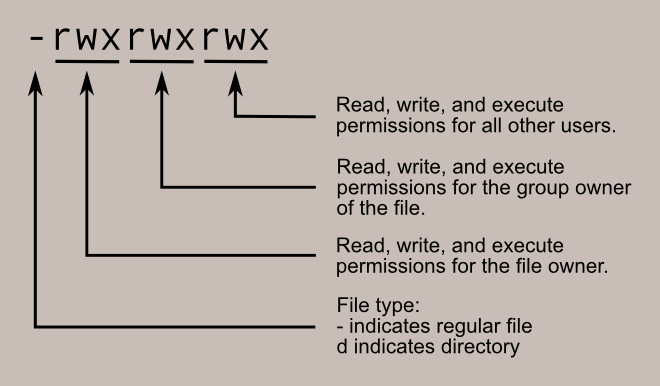
- Legend
- User or Owner
U - Group
G - World (Other Users)
W
- User or Owner
- Permission Classes
- Read
r - Write
w - Execute
x
- Read
- File Type
-regular fileddirectory
- Examples
- file desktop.ini:
-rwxrwxrwx 1 seed seed 282 Dec 27 10:10 desktop.ini - directory host:
drwxrwxrwx 1 seed seed 4096 Jan 20 13:22 host
Number Permission Type Symbol 0 No Permission — 1 Execute –x 2 Write -w- 3 Execute + Write -wx 4 Read r– 5 Read + Execute r-x 6 Read +Write rw- 7 Read + Write +Execute rwx - file desktop.ini:
- Permission Examples
chmod 777 filename: rwx rwx rwxchmod 775 filename: rwx rwx r-xchmod 755 filename: rwx r-x r-xchmod 664 filename: rw- rw- r–chmod 644 filename: rw- r– r–
Networking
ifconfig -adisplays all network interfaces and IP address.hostname -Idisplays the IP addresses of the host (all local IP addresses).host domaindisplays IP address for domain.ping hostsends ICMP echo request to host.whois domaindisplays whois records for domain.dig domaindisplays DNS information for domain.dig -x IPdoes reverse lookup of IP address.nslookupquery Internet name servers interactively.- To display the IP/kernel routing table:
netstat -rnip routeroute -n
Process commands
bgsends a process to the background.fgruns a stopped process in the foreground.topshows details on all active processes.psgives the status of processes running for a user.pidofgives the process id (PID) of a process.ps PIDgets the status of a particular process.kill PIDkills a process with PID .nicestarts a process with a given priority.
Clone a website
wget --mirror --convert-links --adjust-extension --page-requisites --no-check-certificate --no-parent https://site-to-copy.com
--mirrormake the download recursive.--no-parentdo not crawl the parent/top directory.--convert-linksmakes all the links work properly with the offline copy.--page-requisitesdownload JS/CSS files.--adjust-extensionadd the appropriate extensions (e.g. html, css, js) to files.--no-check-certificateignores SSL certificate errors To top
